Connect and coordinate 8+ leading AI CLI tools (Claude, Gemini, Qwen) with natural language commands. Boost productivity 300%+ through intelligent task routing and seamless cross-CLI collaboration.
Based on stigmergy principles - indirect coordination through shared environment
💡 100% Open Source & Free + Free Usage Tutorials = Zero Barriers to Advanced AI Applications - Unleash Your Computer's Full Potential!
cd command)pwd or dir)ls or dir)
💪 Key Point: CLI is not exclusive to programmers! With just 1-2 hours of learning a few core commands,
non-technical users can also enjoy the efficiency boost and automation capabilities that CLI provides.
Single command automatically installs all AI tools, no manual setup needed, complete deployment in 5 minutes
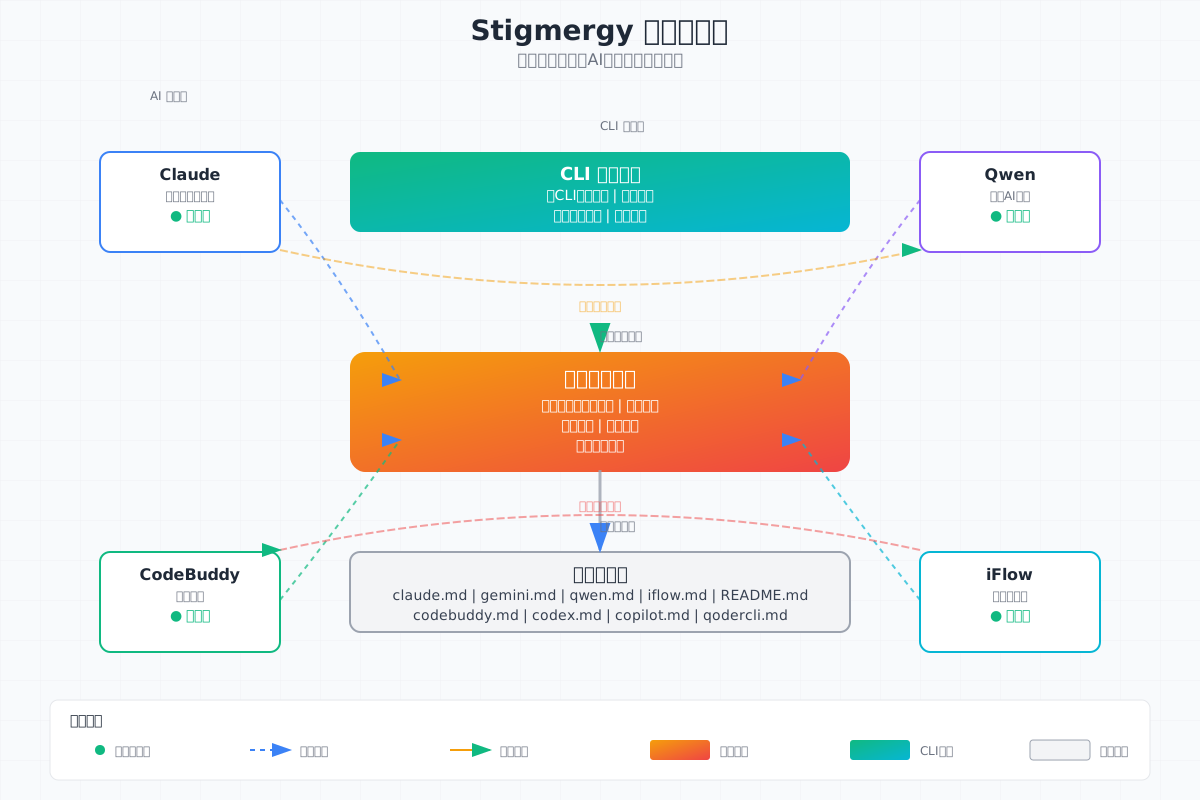
Multiple AI tools work together like a team, sharing information, auto-assigning tasks, completing work efficiently
Tell AI what to do in everyday language, no need to learn complex commands, as simple as chatting
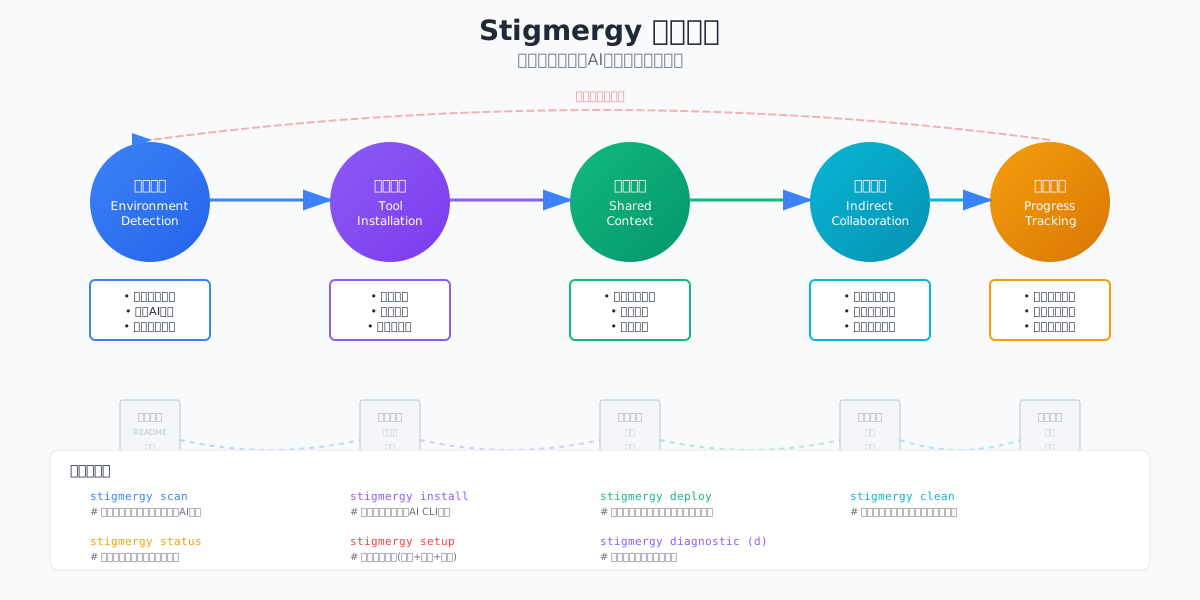
Install Stigmergy system with automatic environment configuration
Scan for AI tools already installed on your system
Install any missing AI tools with one command
Deploy hooks and plugin system for all tools
Call other CLIs from within a CLI
Route to specific CLI
Auto-select best CLI
Save current session history
Optionally restore session
Use /stigmergy-resume command in any CLI to restore session history across tools, maintaining task continuity
Tip: The system works cross-platform (Linux, macOS, Windows) and supports both stigmergy <tool> <task> format and stigmergy call <task> smart routing.
Optionally restore session
Use /stigmergy-resume command in any CLI to restore session history across tools, maintaining task continuity
Tip: The system works cross-platform (Linux, macOS, Windows) and supports both stigmergy <tool> <task> format and stigmergy call <task> smart routing.
💡 Skip this step if Node.js is already installed - Run node --version to check
brew install nodecurl -fsSL https://deb.nodesource.com/setup_lts.x | sudo -E bash - && sudo apt-get install -y nodejswinget install OpenJS.NodeJS.LTSnpm config set registry https://registry.npmmirror.comRun the following command in your terminal/command line:
sudo npm install -g stigmergy
npm install -g stigmergy
✅ After installation, run stigmergy --version to verify successful installation
💡 Best Practice: Open your work folder first, then launch AI tools - this way AI can directly help you process files in your current project!
cd D:\My Documents\Project Files
claude
gemini
qwen
iflow
qoder
codebuddy
github-copilot-cli
stigmergy
# Inside Claude CLI
> use qwen to analyze performance bottlenecks in this code
> ask gemini to translate this doc to Chinese
> use iflow to refactor this function
stigmergy "write a Python web scraper"
stigmergy "analyze architecture issues in this project"
stigmergy "generate API documentation"
cd /path/to/project
claude "design database schema"
qwen "generate ORM models based on schema"
iflow "write unit tests"
Most AI tools offer free tiers perfect for daily use! First launch automatically guides you through login. Start with free versions, upgrade only when needed!
No browser tab switching. Direct terminal operations with shortcuts, command history, and auto-completion - a developer's natural workflow.
Scriptable for automation, integrates into CI/CD pipelines. Web interfaces require manual operation and can't batch process.
Direct file system access, automatic project structure understanding. Web requires manual file uploads with size limits.
Stigmergy enables intelligent coordination between AI tools with shared context. Web interfaces are completely isolated.
Runs locally, sensitive code stays on your machine. Configurable proxies and self-hosting. Web uploads data to cloud.
Supports custom hooks, plugins, skill extensions. Fine-grained control via config files. Web features are fixed.
🎯 Core Difference: CLI is designed for professional developers and productivity scenarios,
while web interfaces suit casual use and lightweight tasks.