Stigmergy AI Collaboration Platform

Connect and coordinate 8+ leading AI CLI tools (Claude, Gemini, Qwen) with natural language commands. Boost productivity 300%+ through intelligent task routing and seamless cross-CLI collaboration.

Based on stigmergy principles - indirect coordination through shared environment

๐Ÿ“Š View Source

Core Features

โšก

One-Command Deployment

Automated installation and configuration through a single command. The system detects your environment, installs missing AI tools, and configures cross-CLI communication with zero manual intervention.

๐Ÿค

Smart Collaboration

Based on stigmergy principles, AI tools collaborate indirectly through shared context (project files, task boards, memory documents) without requiring direct communication channels.

๐Ÿ”„

Workflow Orchestration

Intelligent task routing based on project state and tool capabilities. The system automatically selects the best AI tool for each subtask in complex workflows.

๐Ÿ›ก๏ธ

Fault Tolerance

Multiple redundancy and failover mechanisms ensure system stability. If one tool fails, the system automatically reroutes tasks to available alternatives.

๐Ÿ“Š

Real-time Monitoring

Comprehensive system monitoring with performance metrics, tool status tracking, and collaboration effectiveness analysis for continuous optimization.

๐Ÿ”Œ

Skill Extension

Extend Claude skills to multiple CLI tools through the stigmergy-skills package. Natural language commands automatically route to the best-suited AI tool.

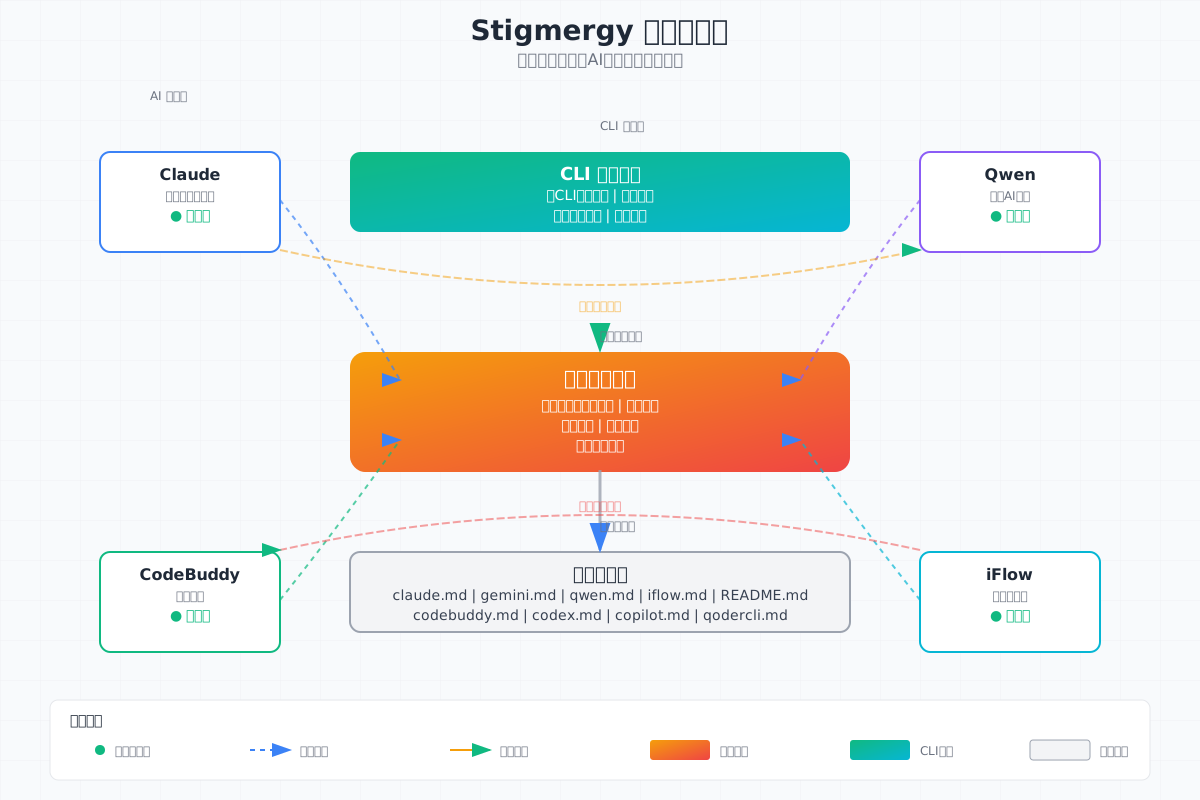
System Architecture

Stigmergy system architecture diagram showing multi-agent AI collaboration through shared environment

System architecture diagram loading failed. Please visit the GitHub repository for the complete diagram.

Visit GitHub Repository

Implementation Principles

1

Smart Scanning System

Automatically scans the local system to detect the 8 most popular and powerful AI tools: Claude, Gemini, Qwen, iFlow, Qoder, CodeBuddy, Copilot, and Codex.

2

One-Click Install & Deploy

For missing tools, the system provides one-click installation and deployment options. Simplify installation and setup processes across all supported AI platforms.

3

Smart Adapter System

Individually analyzes each AI tool's help documentation and plugin mechanisms, generating command templates and parameter configurations to simplify usage and enable natural language intent recognition.

4

Stigmergy Coordination Principle

Adds intelligent routing to let previously independent AI systems collaborate indirectly based on common project context. Named after the stigmergy principle used by ants for coordinated behavior through environmental cues.

5

Universal Skill Interface

Implements generic skill extension interfaces for each AI, allowing a single skill extension to work across multiple AI systems, improving code reusability.

6

Shared Session History

Supports sharing of historical sessions across AI tools, enabling seamless switching between different AI tools for the same task to avoid limitations of single-tool approaches.

7

Skill Package Extensions

Future support for specialized skill packages in different domains, allowing selection of a main package (with core functionality) plus domain-specific skill packages.

8

Simple & User-Friendly

Easy to use with one-line installation npm install -g stigmergy; technology-transparent with direct stigmergy commands; cross-platform support for Linux, macOS, and Windows.

9

AI-Native Development

Zero manual coding, AI-verified. Humans responsible for architecture and testing plans. Most work is comprehensive, repetitive testing involving multi-system coordination and cross-platform compatibility.

Getting Started

1

Install System

npm install -g stigmergy

Install Stigmergy system with automatic environment configuration

โ†’
2

Scan Tools

stigmergy scan

Scan for AI tools already installed on your system

โ†’
3

Install Missing Tools

stigmergy install

Install any missing AI tools with one command

โ†’
4

Deploy Integration

stigmergy deploy

Deploy hooks and plugin system for all tools

โ†’
5a

In-CLI Calls

use claude to "task"

Call other CLIs from within a CLI

+
5b

Direct Routing

stigmergy cli "task"

Route to specific CLI

+
5c

Smart Routing

stigmergy call "task"

Auto-select best CLI

โ†’
Before

Original CLI Session

claude> Developing feature...

Save current session history

โ‡„
After

New CLI Recovery

gemini> Continue development...

Optionally restore session

6

Session Continuity

/stigmergy-resume

Use /stigmergy-resume command in any CLI to restore session history across tools, maintaining task continuity

Tip: The system works cross-platform (Linux, macOS, Windows) and supports both stigmergy <tool> <task> format and stigmergy call <task> smart routing.
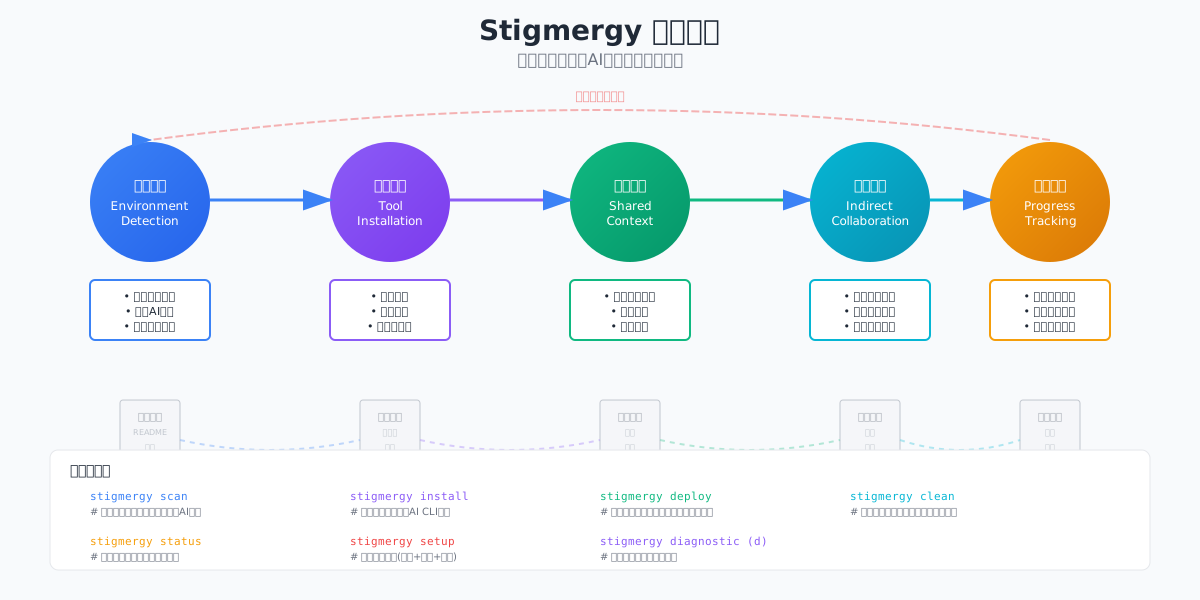
Workflow

Stigmergy workflow diagram showing task routing and AI collaboration

Workflow diagram loading failed. Please visit the GitHub repository for the complete diagram.

Visit GitHub Repository

Supported AI Tools

๐Ÿ“
Claude
Configurable free model
Anthropic's AI assistant with powerful code generation, document writing, and complex reasoning capabilities. Supports multi-turn conversations and long text processing.
Operational
๐Ÿค–
Qwen
(Free, usage limits, upgrade plans available)
Alibaba's Qwen optimized for Chinese, with multimodal interaction support. Excels in Chinese language understanding and cultural context.
Operational
๐Ÿ‘ฅ
CodeBuddy
(Free, usage limits, upgrade plans available)
Intelligent coding companion providing real-time suggestions, error detection, and refactoring optimization. Supports multiple programming languages and development frameworks.
Operational
๐ŸŒŠ
iFlow
Completely free
Intelligent workflow orchestration engine supporting automation of complex business processes. Features visual process design and powerful task scheduling capabilities.
Operational
๐Ÿ’ป
QoderCLI
(Free, usage limits, upgrade plans available)
Professional code assistant with smart completion, syntax analysis, and performance optimization suggestions. Provides comprehensive development lifecycle support.
Operational
๐ŸŒŸ
Gemini
Configurable free model
Google's multimodal AI assistant supporting text, image, and code understanding. Excels at multilingual processing and creative tasks.
Operational
๐Ÿง 
Codex
Configurable free model
OpenAI's code generation model, a professional programming AI assistant supporting multiple languages. Outstanding in code understanding and generation.
Operational
๐Ÿ™
GitHub Copilot
Requires GitHub subscription
GitHub's official AI coding assistant with deep IDE integration, providing real-time suggestions, auto-completion, and intelligent refactoring.
Operational

Quick Start

๐Ÿ“‹ Installation Requirements

Stigmergy AI Collaboration Platform requires Node.js. Choose the appropriate one-click installation for your OS:

๐ŸชŸ Windows

# Install with domestic mirror winget install OpenJS.NodeJS --source winget
# Or use Taobao mirror npm config set registry https://registry.npmmirror.com npm install -g n n stable

๐ŸŽ macOS

# Install with domestic mirror brew install node
# Configure Taobao mirror npm config set registry https://registry.npmmirror.com curl -o- https://raw.githubusercontent.com/nvm-sh/nvm/v0.39.0/install.sh | bash nvm install stable

๐Ÿง Linux

# Ubuntu/Debian with domestic mirror curl -fsSL https://deb.nodesource.com/setup_lts.x | sudo -E bash - sudo apt-get install -y nodejs
# Configure Taobao mirror npm config set registry https://registry.npmmirror.com curl -o- https://raw.githubusercontent.com/nvm-sh/nvm/v0.39.0/install.sh | bash source ~/.bashrc nvm install stable

๐Ÿ’ก Tip: After installation, verify with node --version and npm --version.

Stigmergy CLI - Intelligent Deployment Terminal
$ npm install -g stigmergy